Appalachian Lab
Monthly Newsletter

Happy New Year to everyone! We hope you had a restful break and are staying warm through this recent cold snap.

In this month’s newsletter, we’d like to highlight the upcoming UMCES Strategic Planning process, which officially kicks off this month. We strongly encourage members of our work community to participate as opportunities for engagement and feedback become available.

The Strategic Plan will play a critical role in shaping UMCES’s mission, priorities, and direction, as well as the allocation of resources, in the years ahead. Your perspectives, ideas, and experiences are essential to ensuring that the plan reflects the needs and values of our community. Participating in this process is a meaningful way to help influence the future of our institution and contribute to decisions that will guide our work moving forward.

You might be wondering how you can get involved. You should have received an email last week from the Strategic Planning Chairs, Lois Colaprete and Raleigh Hood.  In that email they highlighted two engagement opportunities.  One is an institution-wide survey that you’ll be receiving via email. Please keep an eye out for that notice. The other is the opportunity to participate in a focus group.  In their email, Lois and Raleigh invited you to nominate individuals via this form.  You may have also received notice about these focus groups through your shared governance representative.  If you’re interested, we strongly encourage you not to wait to be nominated and nominate yourself using this link.

We hope you’ll take advantage of this opportunity to share your voice and help shape what comes next for UMCES.  Engagement now helps ensure that future decisions reflect the collective input of the AL community.

News and Announcements

John and Bob are Retiring!

As you may already know, John Piasecki and Bob Hilderbrand are both retiring in the coming months.  To recognize and thank them for their important contributions to our institution, we will be holding a celebration on February 27th at noon in the classroom with pizza and cake.  It will be a casual gathering to share stories, express our gratitude for their service, and send John and Bob off with our best wishes.  

Please RSVP to Heather or Dave by February 15th so that we can plan accordingly.  If you’d like to contribute toward a group retirement gift, please see Heather or Dave.

Daily Community Lunch

If you’d like to unwind and catch up with your colleagues, join us in the lounge daily at noon for a community lunch.  All are welcome to join!

Ombuds Learning Time

UMCES recently announced learning opportunities with our ombuds.  These are a great opportunity to help sharpen your everyday conflict skills and improve your ability to have difficult conversations, reset expectations, and reduce friction in your professional interactions before things escalate.  Each month, they’ll cover one tool you can use immediately.  If you’re “stuck”, you’ll also be able to identify options and resources.  These sessions are available to anyone needing to navigate interpersonal relationships at work.  

When: Feb 9, 2026 02:00 PM Eastern Time (US and Canada)

Register in advance for this meeting:
https://us06web.zoom.us/meeting/register/SEXsYc0oQlebwBlhZc-O7w

New All Things UMCES Calendar

UMCES recently announced a new UMCES-wide calendar.  It shows all of UMCES’ internal and external events in one place.  Here’s how you can access the All UMCES Events calendar:

Recent Achievements/Activities/Successes

MEA Proposal

At the end of 2025, AL submitted a proposal to the Maryland Energy Administration (MEA) to electrify our building by replacing the existing natural gas boilers and aging chillers with a high-efficiency air-source heat pump system to heat and cool our facility. If awarded, this would be a monumental step in reducing our carbon footprint.

Wired and Wireless Network Updates

The Appalachian Regional Commission funded wired and wireless network updates are now complete.  Category 7 copper wiring has replaced Category 5 and multi-mode fiber has been replaced with modern single-mode fiber-optics.  Our wi-fi standard is now at 5-6 GHz.  

With that upgrade comes some important changes that were announced via email.  Here are some reminders:

  • The “ALEVENTS” network password is now UMCES2026. This changes yearly.

  • The “AL_GUEST” network is now gone entirely. Visitors should use ALEVENTS.

  • The main WiFi network for Lab users is “alwifi” (all lower case, no underscore). Your Active Directory credentials work as before.

  • The “alwifi” does not service 2.4GHz (Wireless “G”) clients. It operates in the 5GHz and 6GHz bands exclusively; if this presents a problem for you, let me know.

  • The “AL_WIFI” network is sticking around but will be deprecated in the future. You should use the “alwifi” network whenever possible, but there are still pockets where AL_WIFI will work better. This will be addressed by more hardware coming in the future.


For our tenants, the “AL_NPS” and “AL_DNR” networks work as before.  You may just need to reauthenticate with your network login credentials.

Digital Accessibility

You’ve probably heard some buzz about the importance of digital accessibility lately.  While it has always been important, new digital accessibility regulations taking effect at the end of April will affect how we create and share digital content across UMCES – both internally and externally. In an institution centered on research and education, accessibility is essential to ensuring that our materials, including documents, websites, presentations, online resources, and even emails, can be used by all members of our community.

Digital accessibility is not only a matter of inclusion; it is also a legal requirement. Inaccessible content can expose institutions to complaints, compliance reviews, and legal consequences.

UMCES has announced upcoming training sessions to help provide practical guidance on meeting these requirements and help ensure that our digital work supports both our mission and our legal obligations.  This webinar will provide an introduction to the main areas of digital accessibility and share actionable insights for everyone. Topics will include:

  • An overview of the Title II Ruling

  • What digital content needs to be accessible (including documents, emails, videos, and other digital content – not just websites)

  • Simple steps to improve accessibility

These sessions will have a presentation followed by a Q & A portion. There is no need to pre-register. The same information will be presented at each, so plan to attend one or the other.

Tuesday, February 10, 11AM
https://umces-edu.zoom.us/j/87823280433?pwd=waJjMWaabMBAKB0aTdkfHq9BAQFSn9.1

Thursday, February 12, 2PM
https://umces-edu.zoom.us/j/83034415172?pwd=lkI0lHgWe38M8oPKineLQRAYgfbHgx.1

If you’d like to explore digital accessibility in advance of these, please visit the UMCES Accessibility Intranet page.

To help keep us from feeling overwhelmed, we’ll be featuring digital accessibility tips in our monthly newsletter to help get you started on this journey and make your content more inclusive.  We should all be setting a goal of continuous improvement with the accessibility our digital materials. 

Tip #1 – Use built-in heading styles in Word, PowerPoint, and LMS editors.

This month’s accessibility tip focuses on a simple but powerful practice: using built-in heading styles in tools like Word, PowerPoint, and learning management systems. While increasing font size, bolding text, or adding color may make content look organized, those visual cues are not recognized by assistive technologies.

Screen readers and other assistive tools rely on structural information, like heading levels, to understand how content is organized and to help users navigate efficiently. Built-in heading styles create that structure behind the scenes, allowing users to jump between sections, scan documents, and understand relationships between ideas.

When headings are created using only visual formatting, that structure is lost. To assistive technology, the content becomes a long, unbroken block of text, making it harder—and sometimes frustrating—to use. Applying true heading styles takes only a moment, but it dramatically improves usability, accessibility, and compliance for everyone who relies on these tools.

Use headings in the correct order

When you use headings, they need to be in the correct order on the page.  The main heading, normally the page or document title, would be Heading 1.  There should only be one Heading 1 used.  The next level, and the heading you’d use most, is Heading 2.  The sub-heading under Heading 2 would be Heading 3, and so on:
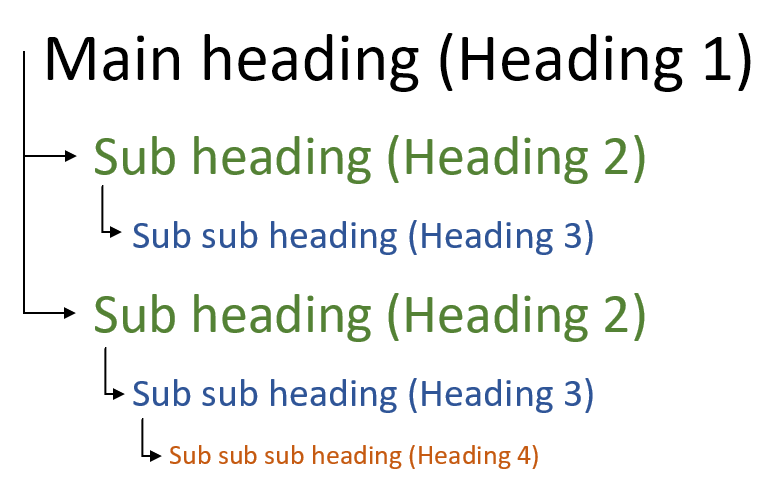
An illustration of appropriate heading hierarchy to ensure digital accessibility. The main heading (heading 1) is listed at the top with heading 2 used as a sub heading and all other sub headings nested below each heading 2.

If this isn’t something that you’re already doing when creating documents, forms, and web pages, this is a small change in habit with a really big impact.  In short, if it looks like a heading, it should be assigned as a heading.

Safety Brief - Slips, Trips, and Falls (Beyond Just Snow and Ice)

Slips, trips, and falls remain one of the most common causes of workplace injuries—and they don’t just happen outdoors or in winter conditions. Loose cords, cluttered walkways, wet floors, uneven surfaces, and poor lighting can all turn everyday spaces into unexpected hazards.

Many of these incidents are preventable with simple actions: keeping walkways clear, securing cords, cleaning up spills promptly, using handrails, and wearing appropriate footwear. Taking a moment to notice and address these hazards helps protect not only yourself, but everyone who shares our spaces.
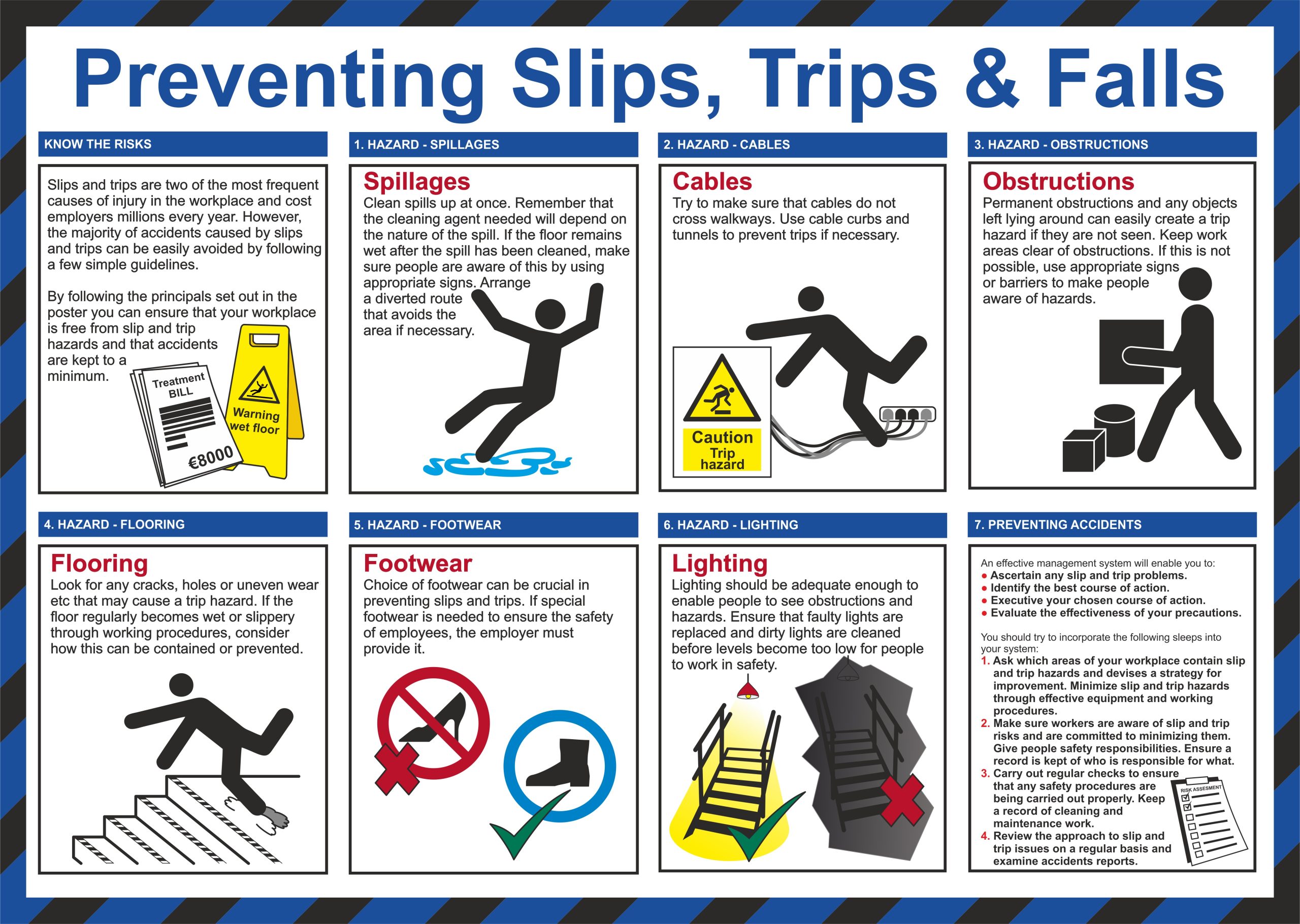
An infographic highlighting the importance of preventing slips, trips. and falls in the workplace with seven key strategies to help:  clean up spills immediately, ensure that cables and cords don't cross walkways, avoid obstructions in areas of egress, watch for damage to flooring and steps, wear appropriate footwear, and keep areas of egress well lit.

Administrative Reminders - Compliance Training

If you’re involved in research at UMCES, you most likely need to complete the recently launched Research Compliance Training programs.  This is a repeat from last month, but now that a completion deadline of April 3rd has been established, we wanted to remind everyone about it.  You should have received emails with the details, but we’ll also break things down for you below:

Who must complete compliance training?

This training must be completed by researchers and research-support personnel, including:

  • PI’s, Co-PI’s, FRA’s
  • Project staff, graduate students, and lab personnel
  • Anyone else engaged in sponsored research activities

Who does not need compliance training?

Most non-research staff do not need to complete this training.  The only exception is if your duties directly intersect with regulated research areas (e.g., assisting with human subject documentation, managing export-controlled information, or handling research data subject to federal requirements).  UMCES OSP will reach out individually to those persons with tailored guidance.

What do I need to complete?

All researchers must complete the Conflict of Interest (COI) annually and the Responsible Conduct of Research (RCR) every three years.  Depending on your research activities you may need to complete some of the other training, like Human Subjects (IRB), Animal Care and Use (IACUC), Biosafety/Biosecurity, and Export Compliance.  These trainings are hosted on the CITI training platform.
 

Additionally, after October 10, 2025, any PIs and Co-PIs submitting proposals to NSF must complete Research Security training. This training is offered through NSF.

These trainings will take some time, so be sure to act sooner rather than later to ensure that non-compliance doesn’t negatively impact the routing of your proposal!

What’s the completion deadline?

The NSF Research Security training must be completed before submitting any future proposal.  April 3rd is the deadline for the COI and RCR trainings through CITI.

How do I access the training?

Click this link to access the CITI Training Platform to complete the COI, RCR, IRB, and IACUC training.

Click this link to access the NSF SECURE Center Consolidated Training Module.

How to document completion?

When you have completed the NSF Research Security training, upload a copy of your certificate to this SharePoint box.

If you need additional information, click here to check out the UMCES Research Compliance Training Guide.

Mark Your Calendars

  • TGIF – February 6th at 3:30 PM
  • Visiting Scholar Seminar Series: Mary Janecka – February 13th at 11 AM
  • February Town Hall – February 27th at 11 AM
  • Retirement Celebration for John & Bob – February 27th at NOON
  • Visiting Scholar Seminar Series: Scott Loss – March 13th at 11 AM
  • Spring Break: Lab Closed – March 16th and 17th
  • Visiting Scholar Seminar Series: Justine Whitaker – March 27th at 11 AM
  • March Town Hall – March 27th at 2 PM
  • UMCES Faculty Convocation – May 11-12 at CBL
  • UMCES Graduation – May 29th at IMET


Do you have an announcement or update you’d like to include in a future newsletter?

AL’s monthly newsletter is issued following the monthly town hall meeting.  Please submit any announcements and updates to Katie Kline or Heather Johnson before the close of business on the first Friday of each month to ensure that your content can be included in that month’s newsletter.

Quick Links